
Muse Dash
HONGKONG HASUHASU LIMITEDMusic
4.52.60K Reviews
- Version
- 6.6.1
- Installs
- 1.00M
- Age Rating
- Teen
Screenshots



Our Review of Muse Dash
 Analysis by Appyee
Hey there, fellow gamers! If you’re into rhythm games and you haven’t checked out Muse Dash yet, you’re in for a treat. Let me take you on a little journey through this vibrant world where music and action collide in the most entertaining way possible.
Where the first rhythm-game hurdles appear
The first thing I’d keep in mind is that this is not a hands-off music player: you need to watch the action and respond to it. If you expect to relax by listening to a track without concentrating, the incoming obstacles can make that harder than it sounds. The game’s two-sided tapping is easy to understand, but getting comfortable with the timing takes attention, particularly when the screen becomes busy.
That distinction helps when deciding whether to play for a few minutes or settle into a longer session. I find the quick-to-grasp controls useful for a short break, while tougher tracks are better approached when I can focus rather than split my attention between the game and a conversation. If an early attempt feels messy, I wouldn’t take it as a sign that the whole game is too difficult; a little familiarity with the rhythm and visual cues can change the experience.
It also helps to separate a missed input from a bad run. In a rhythm game, one lapse can interrupt a streak and make the rest of the attempt feel worse than it is. I try to keep playing through a mistake instead of restarting immediately. That gives me a clearer sense of whether I lost the beat once or whether the track’s pace is still outside my comfort zone.
Checks that make a session smoother
Before blaming the controls, I’d check the basics: make sure the screen is responding normally, hold the device in a comfortable position, and avoid covering the areas used for tapping. Since the actions are split across the left and right sides, a grip that works for scrolling or watching video may not be ideal here. A small change in hand position can make repeated inputs feel more deliberate.
I also recommend beginning with a track whose pace feels manageable, rather than treating the hardest available challenge as the best test of skill. That gives you room to learn how the game’s cues line up with the music. If the sound and your taps seem out of sync, try another attempt when you can listen clearly and focus on the screen. Background noise, divided attention, or simply being tired can make timing feel less reliable without pointing to a problem with the game itself.
A useful habit is to change one thing at a time. If a run feels off, keep your approach steady for another attempt before changing how you hold the device or how you follow the beat. When several things change at once, it becomes difficult to tell what actually helped. This is a simple way to make practice less frustrating and to notice whether the difficulty comes from unfamiliar timing or from the way you are playing.
What's the Buzz About?
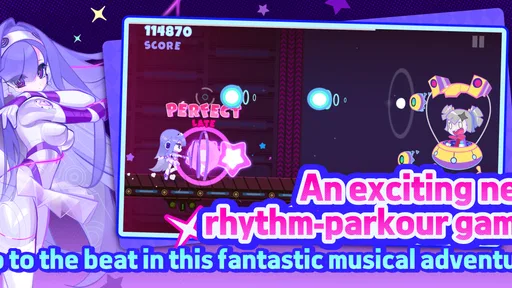
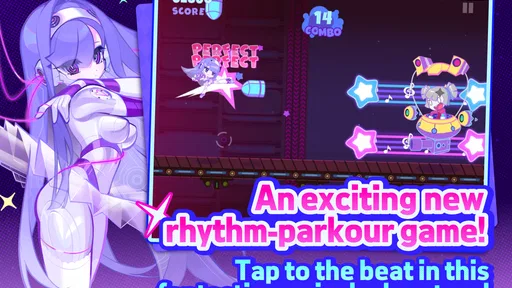
So, I stumbled upon Muse Dash while browsing for something fun and light-hearted to kill some time, and boy, was I hooked! The game is a delightful mash-up of rhythm and action genres, where you tap along to the beat while your character dashes through colorful landscapes, smashing obstacles and enemies in style. It’s like being in a music video where you’re the star, kicking butt and taking names.
Visuals and Music: A Feast for the Senses
You know how some games just grab you with their visuals? Well, Muse Dash is one of them. The art style is vibrant and anime-inspired, with a splash of pastel colors that make everything pop. Each level is beautifully crafted, and the animations are smooth as butter, keeping everything looking fresh and exciting.
Now, let’s talk about the music. The soundtrack is packed with catchy tunes that range from J-pop to electronic beats, each track perfectly syncing with the game’s mechanics. It’s like your fingers are dancing on your device, and trust me, it’s incredibly satisfying to nail those beats.
Gameplay: Easy to Pick Up, Hard to Master
One of the things I love about Muse Dash is how easy it is to jump right in. The controls are straightforward: tap the left side of the screen to attack low, and the right side for high attacks. It’s simple, but as you progress, it becomes a rhythmic challenge that requires some serious focus and timing.
As you advance through the levels, the difficulty ramps up, with more obstacles and enemies coming at you faster. It’s not just about keeping up with the beat; it’s about anticipating the next move and staying in the groove. It’s a game that keeps you on your toes, and the sense of achievement when you conquer a challenging track is pure bliss.
Making progress without turning every run into a test
For a practical routine, I’d use an easier track as a warm-up, then try one that asks a little more of my timing. Repeating the same section can be useful, but repeating a whole run while annoyed usually isn’t. A short pause gives your hands and attention a reset, and it’s often easier to spot the rhythm after stepping away for a moment.
The game works especially well for someone who likes music games but wants more visual action than a conventional note-lane setup. Compared with the usual rhythm-game format, where the main job is following symbols toward a target line, this one makes the character’s movement and incoming threats part of the reading task. That gives it a lively, arcade-like feel, though players who prefer a clean, minimal interface may find the extra visual activity distracting.
For example, I can imagine playing a track while waiting for a friend or taking a break between tasks: one attempt gives me a contained challenge, and I can stop without needing to organize a long session. If I want a calmer listening experience or a game that asks almost nothing of my eyes, I’d choose a different kind of music app or a less action-heavy rhythm game instead. The right fit depends on whether I want to actively play along or simply have music in the background.
Characters and Customization
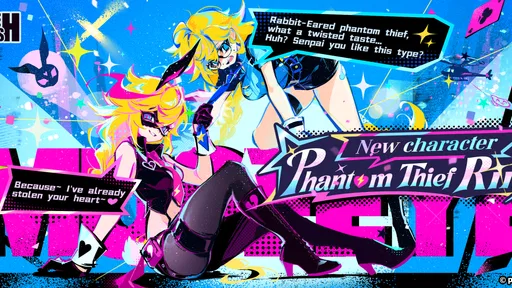
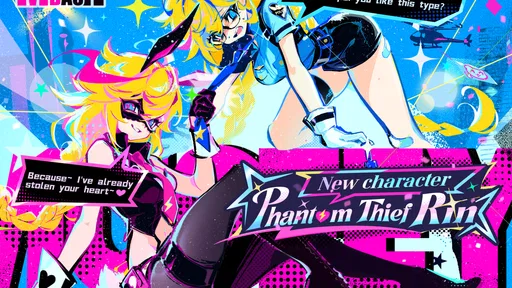
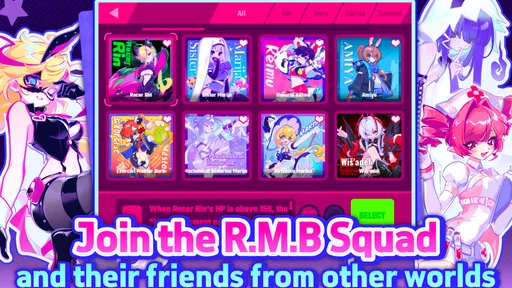
You’ll meet a trio of charming characters in Muse Dash, each with their own unique abilities. As you play, you can unlock different skins and outfits, giving you a chance to personalize your in-game persona. It’s a nice touch that adds a bit of flair and gives you something to work towards as you climb the leaderboards.
My advice is to treat character choices and unlocks as a reason to explore, not as a shortcut to mastering timing. The most useful personal adjustment is still finding a comfortable way to tap and read what is happening on screen. If you are mainly here for the music and the feel of a track, cosmetic rewards are a pleasant extra; if collecting outfits is your main goal, they may not be enough on their own to keep every session engaging.
Replayability and Content
Now, let’s get real about replayability. Muse Dash keeps things fresh with a variety of tracks and challenges. Plus, the developers frequently update the game with new content, so there’s always something to look forward to. Whether you’re aiming to perfect your high scores or just enjoy the ride, there’s plenty to keep you coming back for more.
It is a paid game, priced at $0.49, with in-app purchases ranging from $0.99 to $33.99 per item. I’d decide what I want from it before spending beyond the initial purchase: the core appeal for me is the rhythm-action play, while optional purchases are a separate consideration. The game is made by hasuhasu, has a Teen age rating, and its current version is 6.0.1. It was released on June 15, 2018, and supports Android 7.0 and later.
That pricing setup is worth considering if you are comparing it with free-to-start rhythm games. A low entry price can feel straightforward, but the presence of in-app purchases means I would not assume every extra is included in that initial cost. I’d check what an optional item offers before buying it and decide whether it adds something I personally care about. If you prefer to know that everything you might want is covered by one purchase, that distinction may matter more than the game’s quick start.
There is also a practical difference between replaying for a better score and replaying just to enjoy the music. Chasing a perfect run can be motivating, but it can turn a cheerful session into a demanding one. When I feel that happening, I switch back to playing for the flow of a track rather than judging every input. That keeps the game enjoyable even when I am not improving a score.
Oh, and did I mention the thrill of completing a track with a perfect combo? It’s the kind of achievement that makes you pump your fist in triumph, even if you’re just chilling on your couch.
When the problem may be outside the game
If the game suddenly feels harder to control, I would first check whether my hands are tired, my grip has shifted, or I am trying to play while distracted. Those ordinary factors can affect timing and touch accuracy. I’d also try a different track to see whether the difficulty is specific to one rhythm or whether every attempt feels awkward. That comparison is more useful than immediately assuming something is wrong with the game.
For a device that is generally responding poorly to taps, it makes sense to test the screen in other ordinary uses before drawing conclusions about this game. If the issue appears only during a particular track, the track’s pace or the visual load may simply be challenging. If the same touch problem occurs elsewhere too, changing in-game strategy is unlikely to solve it. Keeping that distinction in mind prevents wasted effort and makes troubleshooting calmer.
It is also reasonable to take a break rather than pushing through a frustrating run. Rhythm games reward attention, and a tired player can mistake fading concentration for a control problem. Coming back later with a comfortable grip, clear audio, and a manageable track is a more useful test than repeatedly tapping harder or restarting in a hurry.
Who will enjoy it, and who may prefer another rhythm game
I’d recommend this to players who enjoy tapping in time but want a little more happening on screen than notes moving along a traditional lane. It is also a good fit for short, focused sessions: a track gives you a clear start, a challenge, and an endpoint. With an average rating of 4.5 from around 64,000 ratings and over 1 million installs, it has clearly found an audience, though those figures do not determine whether its particular style will suit you.
I’d be more cautious if you are sensitive to busy visuals, want a purely passive music experience, or prefer rhythm games that make every cue visually spare. The action presentation is part of the appeal, but it also asks you to process more than the beat alone. And if you dislike retrying tracks to improve timing, the game’s score-focused satisfaction may not be as compelling for you as a less demanding music experience.
Final Thoughts
In a nutshell, if you’re a fan of rhythm games or just looking for something unique and entertaining, give Muse Dash a spin. It’s a delightful blend of music and action that’s easy to dive into but challenging enough to keep you engaged. It’s the kind of game that puts a smile on your face and a beat in your heart.
So go ahead, hit that download link, and let the rhythm take you on a wild ride. Trust me, once you start, it’s hard to stop. Happy gaming!
Verdict
Strengths of Muse Dash
- Vibrant and engaging visuals.
- Catchy and diverse soundtrack.
- Simple, intuitive controls.
- Frequent updates with new content.
- Low storage requirement.
Limitations of Muse Dash
- Limited multiplayer options.
- Repetitive gameplay over time.
- In-app purchases can add up.
- Some songs locked behind paywall.
- Requires constant internet connection.
Similar Picks in This Category
View All
Tiles Hop Music & Ball Game
AMANOTES PTE. LTD.4.3

Magic Tiles 3™ - Piano Game
AMANOTES PTE. LTD.4.6

Real Piano
Bilkon3.7

Piano Game: Classic Music Song
Dream Tiles Piano Game Studio4.0

Smash Colors: Music Ball Rush
BADSNOWBALL HONGKONG LIMITED4.2

Piano Music Go-EDM Piano Games
Joy Journey Music Games4.5
Frequently Asked Questions
What is Muse Dash and what type of game is it?
Muse Dash is a rhythm-based action game that combines music and platforming elements. Players navigate different levels by tapping to the rhythm of catchy music tracks, while controlling characters who battle various enemies. It’s designed to be engaging for both music lovers and gamers seeking a challenging yet entertaining experience.
Is Muse Dash suitable for all ages?
Muse Dash is generally suitable for all ages, though it has some mild cartoon violence as players defeat enemies. The vibrant graphics and upbeat music make it appealing to younger audiences, but it's always best for parents to check the content to ensure it aligns with their preferences for their children.
Does Muse Dash require an internet connection to play?
Muse Dash can be played offline, which is great for users who want to enjoy the game without relying on a constant internet connection. However, some features, such as downloading additional music packs or accessing online leaderboards, will require internet access.
What are the in-app purchases in Muse Dash?
Muse Dash offers in-app purchases that mainly consist of additional music packs and character skins. These purchases enhance the gameplay experience by providing more variety in music and customization options. While the base game includes plenty of content, these optional purchases are there for players who want to expand their game further.
How does Muse Dash handle difficulty settings?
Muse Dash features multiple difficulty levels to cater to different skill levels. Players can choose from easy to challenging settings, allowing newcomers to enjoy the game without frustration, while offering seasoned players a chance to test their rhythm skills. This flexibility makes it accessible and enjoyable for a wide range of users.
Play our best games!


